

Cornerstone MicroApps Susan Smit March 5, 2026

Cornerstone MicroApps: The Views Your Platform Has Been Missing

Cornerstone stores a wealth of data – training records, certifications, compliance, performance data, career paths, team structures, and learning histories.

MicroApps connect to real-time Cornerstone data through platform APIs, delivering focused, task-ready views that live right inside CSOD. No exports. No extra tools. Just instant access for managers, employees, and HR – exactly where they need it.

Because the data is already there. The right views just weren’t.

MicroApps. Major Impact

Cornerstone MicroApps are modular applications that run directly inside the Cornerstone platform. Each MicroApp is built for a specific use case such as team progress, employee tasks, approvals, or engagement insights. They connect to live Cornerstone data through the platform APIs and present it in focused interfaces designed for real work. Managers see their team. Employees see what requires attention. HR teams gain operational visibility across the organization.

MicroApps can be deployed individually or combined into a suite that grows with your needs.

Run directly inside Cornerstone

Deployed on Cornerstone custom pages and designed to run directly inside your platform environment.

Connect to live platform data

Pull real time information through Cornerstone APIs.

Built for specific operational use cases

MicroApps power team progress dashboards, employee task views, approvals, and engagement insights.

Role aware by design

Managers, employees, and HR teams see the information relevant to them.

Aligned with your brand

Styled to match your organization’s colors, fonts, and visual identity inside Cornerstone.

Modular and expandable

Start with one MicroApp and add more as new needs emerge.

Discover the Details

What MicroApps Make Possible

MicroApps open up new ways to work with the data already stored inside Cornerstone. Instead of navigating multiple pages or building complex reports, information is presented in focused operational views designed for everyday tasks. Managers gain immediate insight into team progress. Employees clearly see what requires attention. HR teams gain visibility across the organization.

Because MicroApps operate directly on platform data, they also remove many of the limitations teams often encounter with standard reporting and configuration.

No reporting row limitations

MicroApps are not restricted by the row limits found in Reporting 2.0.

Faster data processing

Direct data connections allow large datasets to load and process significantly faster.

Immediate action

Managers can review training progress and send reminders directly from the same view.

More flexibility for new features

MicroApps make it possible to introduce functionality that would be difficult or impossible through traditional customization.

Beyond Customization

Why MicroApps Expand What Cornerstone Can Do

For years, most Cornerstone customization focused on the visual layer. Branding, layouts, navigation, and content presentation.

MicroApps go further.

They introduce fully functional applications inside the platform that can read live data and present it in ways the standard interface cannot. Instead of adjusting how Cornerstone looks, MicroApps expand what the platform can actually do.

Traditional Customization
Cornerstone MicroApps
Easily collect the features you’re interested in, before reaching out to us.
Maximize Your Impact

Applications Running Inside Cornerstone

MicroApps are designed around specific operational needs. Each app focuses on one clear task and surfaces the information people need directly inside the platform.

Organizations can deploy one MicroApp or combine several to
support different roles across the platform.

See Your Team’s Learning at a Glance
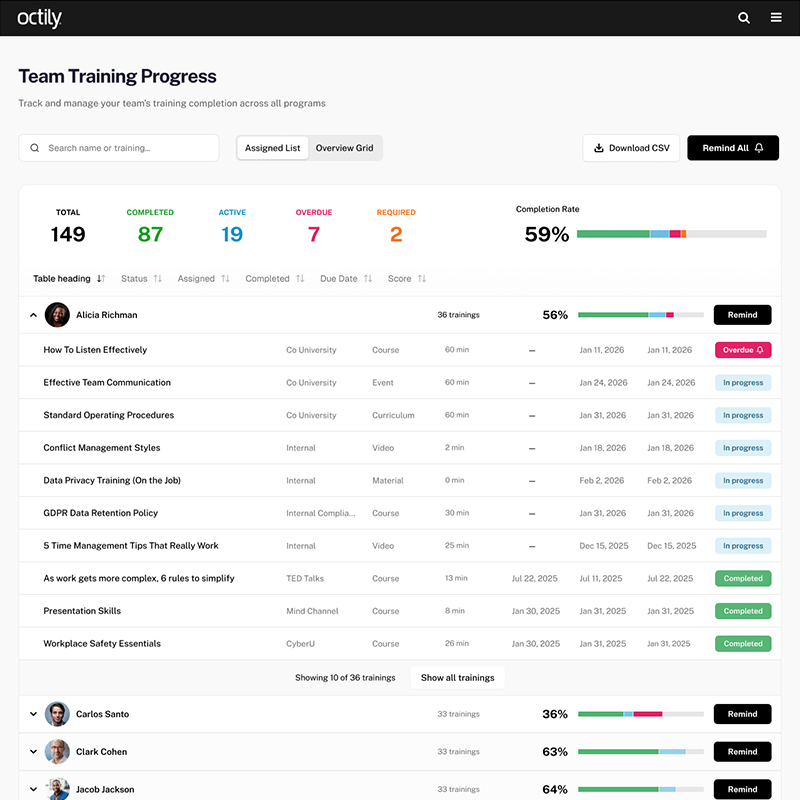
Team Training Progress

Managers often need to jump between reports, transcripts, and dashboards to understand how their team is progressing with training. The Team Training Progress MicroApp brings everything together in one clear overview so managers can instantly see progress, identify overdue items, and take action.

What makes it powerful

  • Complete team training overview
    See progress across all assigned learning in one view including completed, active, overdue, and required training.
  • Individual progress visibility
    Expand each team member to see their personal training status and learning grid.
  • Send reminders instantly
    Managers can nudge employees directly about open or overdue training.
  • Assign new learning
    Assign additional training without leaving the dashboard.
  • Clear visual dashboard
    Status breakdowns help managers quickly understand team progress and easily present updates when needed.
  • Powerful filtering and search
    Sort, filter, and search across team members and learning items to find what matters quickly.
  • Export when needed
    Download data as CSV for reporting or sharing.
  • Designed for real work
    Responsive layout and styling that aligns with your organization’s brand.
Never lose track of your tasks again.
My Todo's

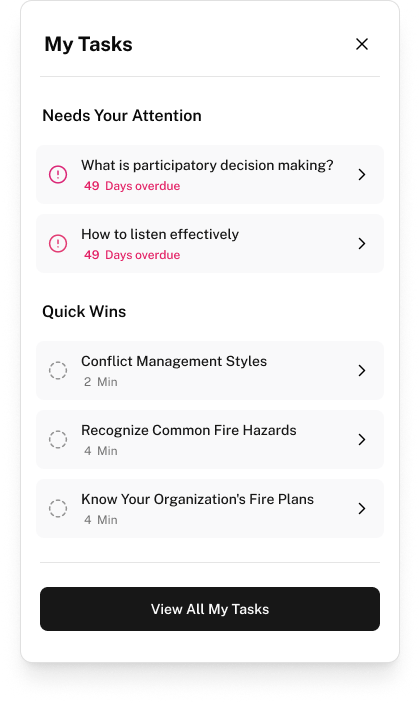
Employees often need to navigate multiple pages to understand what training or tasks require attention. MyTodo brings everything together in one clear overview so people can immediately see what needs to be done and plan their time accordingly.

What makes it powerful

  • Complete task overview
    See required training, certifications, and other tasks in one clear list.
  • Instant status summary
    A compact information bar shows what is overdue, due this week, still open, and what you have already completed this month.
  • Focus of the week
    Highlight the most important tasks that require attention in the coming days.
  • Quick wins
    Identify smaller tasks below 15 min that can be completed quickly and get them out of the way.
  • Powerful filtering and search
    Easily explore and filter your tasks when you need the full overview.
  • Optional sticky task widget
    Activate a small task view that follows you through Cornerstone and links directly back to the full MyTodo app.
  • Plan time for your learning
    Use the built in calendar blocker to reserve focus time for training or tasks later in the week.
  • Flexible placement
    The MyTodo app can be placed on any custom page inside your Cornerstone environment.
Track Engagement, Activity, and Risk in One View
Engagement Dashboards
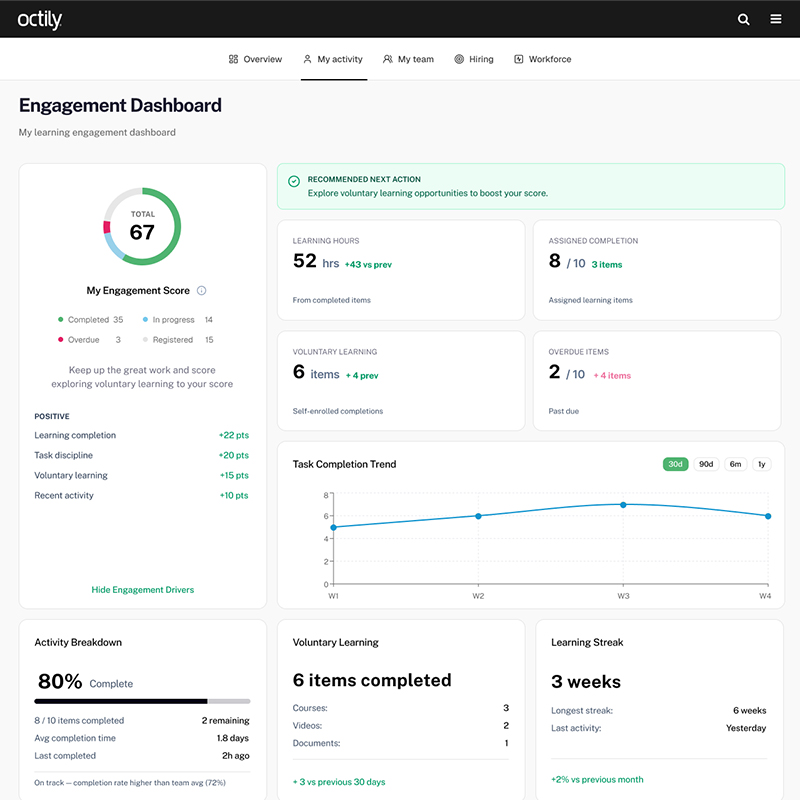
Understanding how teams engage with learning, tasks, and performance activity often requires navigating multiple reports. The Engagement Dashboard MicroApp brings these signals together in one operational dashboard so managers and HR teams can quickly understand engagement levels and identify where action is needed. Instead of exporting data or switching between different areas of the platform, the dashboard surfaces engagement signals, team activity, hiring trends, and operational readiness directly inside Cornerstone.

What makes it powerful

  • Clear engagement overview
    Combine learning activity, task completion, manager interactions, and survey participation into one engagement score.
  • Spot risks early
    Highlight signals such as inactive employees, overdue learning, declining activity trends, or expiring certifications.
  • Understand your team instantly
    See how team members are progressing and quickly identify who needs support or intervention.
  • Workforce and hiring insights
    Track open roles, hiring momentum, and recent hires to understand how team capacity is evolving.
  • Operational readiness visibility
    Monitor expiring certifications, qualification coverage, and compliance risks in operational environments.
  • Take action directly from the dashboard
    Send reminders, assign learning, schedule check-ins, or review employee details without leaving the view.
Architecture, Security, and Performance

Built for Enterprise HR Platforms

Cornerstone MicroApps are designed to integrate directly with your existing Cornerstone environment without changing the underlying platform.


They run on Cornerstone’s official APIs and are designed to integrate directly within your Cornerstone environment, ensuring compatibility with your current setup and future platform upgrades.

Runs inside your Cornerstone environment

MicroApps deploy on custom pages within the platform employees already use.

Secure authentication

OAuth 2.0 authentication ensures access is tied to the user’s active Cornerstone session.

No data stored externally

Employee data is retrieved in real time and processed during the session without being stored.

Upgrade safe by design

MicroApps use official Cornerstone APIs and do not modify the platform’s core functionality.

Accessible and responsive

Designed to meet WCAG accessibility standards and work across devices.

Aligned with your brand

Interfaces can match your organization’s colors and visual style.

Simple Setup. Fast Deployment.

From Idea to Live MicroApp

MicroApps integrate directly with your existing Cornerstone environment and can be deployed without changing the underlying platform. Because each MicroApp is modular, organizations can start with a single use case and expand over time as new needs emerge.
1
Discover.

We identify the use cases that will deliver the most value for your organization.

2
Build.

The MicroApp is configured to connect securely to your Cornerstone environment and aligned with your brand.

3
Deploy.

The app is deployed on your Cornerstone custom pages and can be extended with additional MicroApps over time.

Let's connect
Any questions?
Our team is here to help. Don't hesitate to reach out for the support you need.
Frequently asked questions

Cornerstone MicroApps are modular applications that run directly inside the Cornerstone platform. They connect to live data through Cornerstone APIs and present information in focused views designed for real operational tasks such as training progress, employee task lists, or engagement insights.

Traditional customization mainly focuses on the visual layer, such as branding, layouts, or content presentation. MicroApps go further by introducing functional applications that can read platform data and present it in interactive views with filtering, dashboards, and operational actions.

No. MicroApps run inside the existing Cornerstone environment and use the employee’s active platform session. Users access the app directly from a Cornerstone custom page without logging into another system.

MicroApps can access many types of platform data depending on the use case, including training records, certifications, learning assignments, team structures, and employee information. Access is controlled through the API permissions configured by the Cornerstone administrator.

Yes. MicroApps use secure OAuth authentication and connect to Cornerstone through official APIs. Data is retrieved in real time during the user session and is not stored externally.

No .MicroApps rely on Cornerstone’s supported APIs and do not modify the core platform, which keeps them compatible with future upgrades.

Yes. MicroApps can be styled to match your organization’s colors, fonts, and design guidelines so they fit naturally within your Cornerstone environment.

Absolutely. MicroApps are modular, so organizations can start with one use case and add additional apps as new needs emerge.

Ready to See MicroApps in Action?
MicroApps open up entirely new ways to work with the data already inside your Cornerstone platform.

Instead of navigating reports or exporting spreadsheets, teams gain clear operational views that help managers, employees, and HR take action faster.

The examples on this page are just the beginning. Our team already has a long list of new MicroApps in development, and the modular setup makes it easy to introduce additional functionality as new needs emerge.

Have a specific challenge inside your Cornerstone environment? MicroApps give us the flexibility to build experiences tailored to your organization.

We’d love to show you what’s possible.

"Partnering with Octily, we've enhanced our recruiting module by introducing a new Career Site template that clients can easily customize and implement. This initiative has transformed a traditionally complex and costly process into a straightforward and affordable solution."

Davide Campagnol

Team Lead, Global Portal Experience
Cornerstone OnDemand

Octily_Image-11
CUSTOMIZATION
Compliance

Ensure your organization stays ahead of regulatory requirements with tailored compliance tools and strategies.
Explore more
OCE-Octily-Content-Editor
CUSTOMIZATION
Employee Engagement

Foster a thriving workplace culture with innovative approaches to enhance employee involvement and satisfaction.

Explore more
Octily_Image-35
CUSTOMIZATION
Unique Custom Pages

Empower your teams with fully personalized pages that align with your organization's unique goals and user needs, ensuring seamless navigation and a tailored experience for every role.
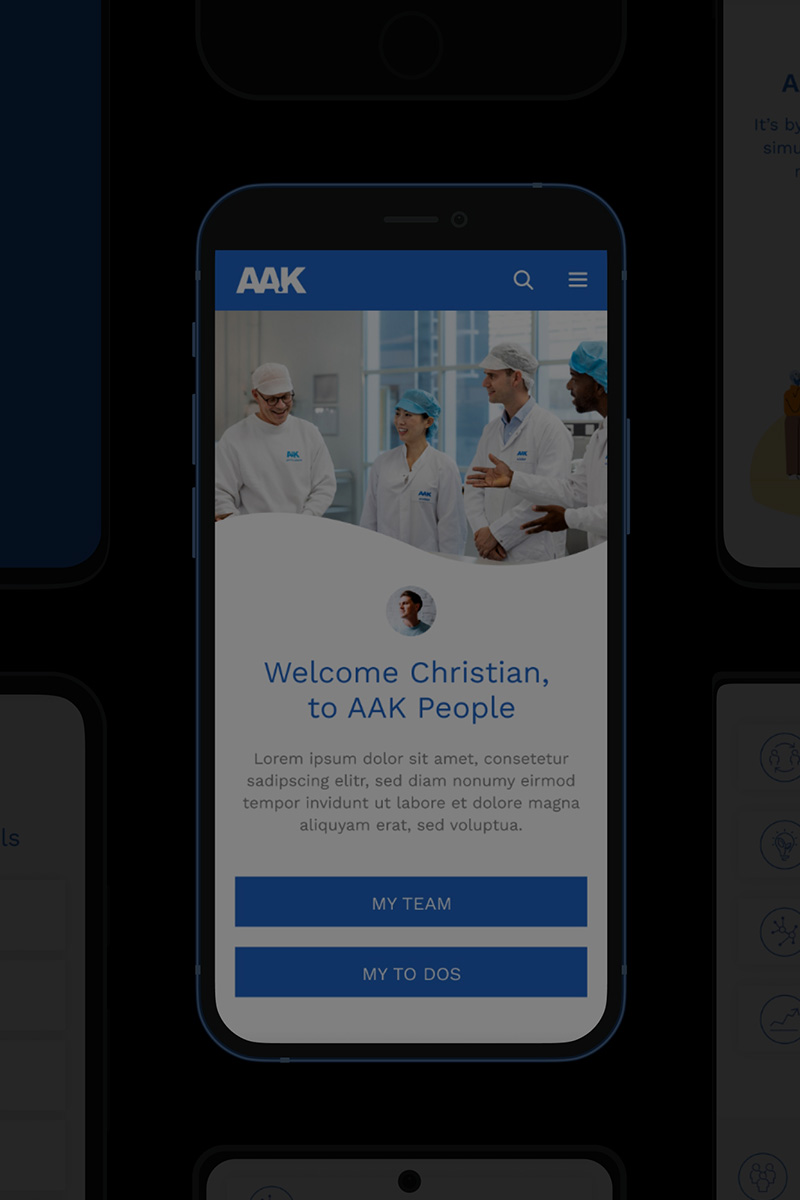
Explore more
Insights-Interview-AAK
INSIGHTS
Driving Transformation at AAK

An Interview with Denise Broberg, Global People Data Insights Manager

Explore more